
Reduce the back-and-forth, and lock in the right support faster with instant booking.
What is instant booking?
Instant booking is a type of support work booking that allows clients and support workers to fast-track the booking process.
Support workers can include an agreement with their application, giving you the key details up front like rates, services and availability, to help you choose the right person faster. This means you can lock in a support worker or your support session faster. When the agreement has been accepted, it will be confirmed instantly and you can message each other to organise your support sessions.
By simply accepting a support worker agreement as part of their application, you can proceed to discussing scheduling sessions!
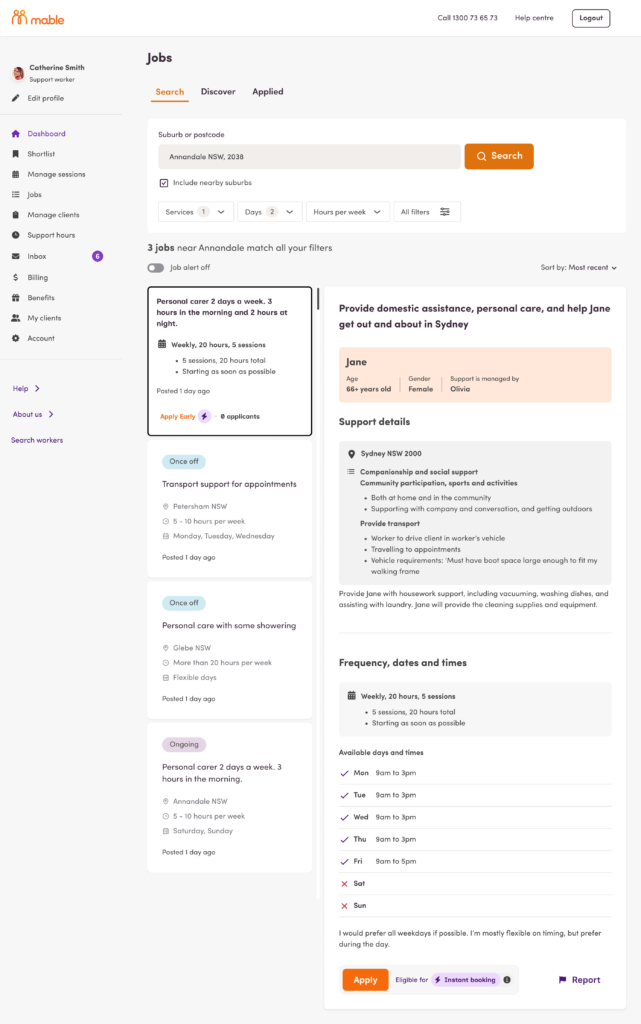
How do I find and book with a support worker offering instant booking?
You can find a support worker who offers instant booking by checking any applications to jobs you’ve posted.
A job might not be eligible for instant booking if Mable is still waiting for verification of your funding or if the support worker’s services don’t match the services in your job post.
Find and book a support worker with instant book
- View Applications.
Navigate to the Manage Workers screen.
This is where all new applications to jobs you've posted appear. - Find instant booking applications.
Eligible applications will display the "instant booking" badge. You can also filter applications by checking the instant booking tick box to bring all instant booking applications to the top of the list. - Review the Application.
Select an application by clicking View application to open the details. - Accept or decline.
You will be presented with the option to click Book now or Decline application.
If you click Book now:The application is accepted and you will see a success message. You will receive an automatic notification message letting you know you've been connected with the support worker and can now start chatting to organise your first session. The agreement is now in place between you both.
If you click Decline application:
You will be asked to select a reason you are declining the application. - Plan the session.
Once you have accepted the support worker's application, you can communicate with the support worker (usually via the inbox) to agree on a time and day for the first session, which your support worker will then book.
How do I set myself up as a support worker offering instant booking?
Set yourself up as an instant booking support worker
- Find and Apply for a Job.
You simply search for a job and click the Apply button. - Application Preference Screen.
If the job is eligible for instant booking, you will see a screen offering you a choice of how you’d like to apply.
Note: Not all jobs are eligible for instant booking. A client might not be able to offer instant booking if they are waiting for funding verification, or if your services don’t match the services in the job post.
Choose how you want to apply.
You must choose one of the following:I accept instant bookings.
You proceed through the usual application steps plus three additional steps: adding your Services, Rates and Agreement. By completing these extra steps, the application should be eligible to instant book, allowing the client to review and accept your application faster.I prefer a conversation first.
This will take you through the current steps to making a booking with a client.