What you need to know about the new way to approve support hours

Aged Care ProvidersNDIS Coordinators

Last updated

7 Oct 2025

Reading time

3 min read

Share

We've made important updates to how support workers submit their hours for clients. This new system is compulsory for aged care clients and optional for NDIS and privately paying clients.

Why we've made the change

Starting 1 November 2025, the new Support at Home funding scheme will require all aged care invoices to include an itemised list of the services provided in a session. This ensures your clients' personal contributions are calculated accurately.

Our current system doesn't meet these new regulatory requirements, so to fix this, we're updating the submission process for support hours.

What does this change mean for you?

With the new system, you'll notice some changes to support hour submissions, approvals and rejections, and invoices.

  • Instead of a general description of services, you'll see a detailed, itemised list.
  • Each service will show its specific rate.
  • You can now accept or reject individual services within a single session
  • Support workers can only select services listed in your client's agreement, minimising the chance of them listing the wrong service.

NDIS and privately paying clients

NDIS and privately paying clients may be interested in the new system. You can let them know it is a great way to get accurate support hours and rates. This means that there is a lower chance of support hour rejections. It can also be helpful when you charge different rates for the same service.

How to accept or reject support hours

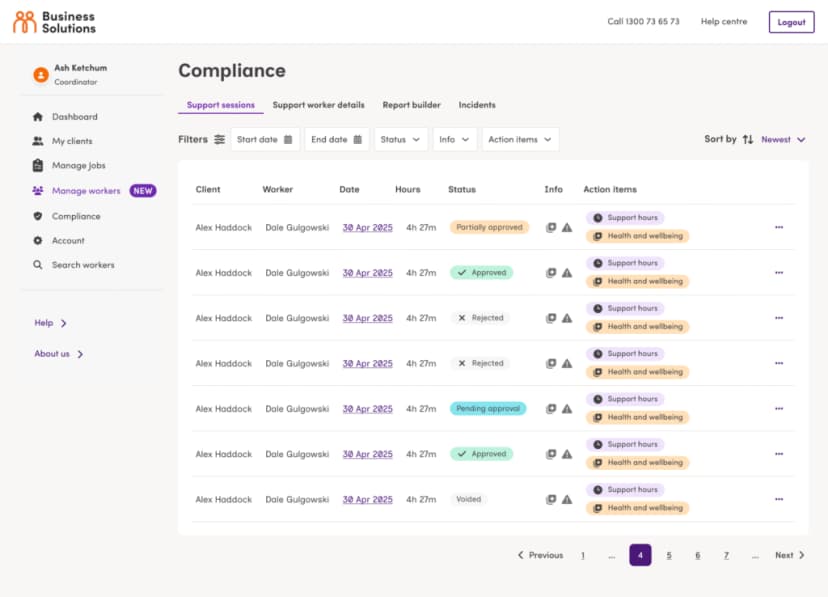
  1. Select Compliance from the main menu.
  1. Select Pending approval from the dropdown menu under the Status filter.
  2. Select the relevant session from the list.
  3. From here, you will be able to see a detailed breakdown of the session, including services delivered, hours, rates, travel, and the total cost.
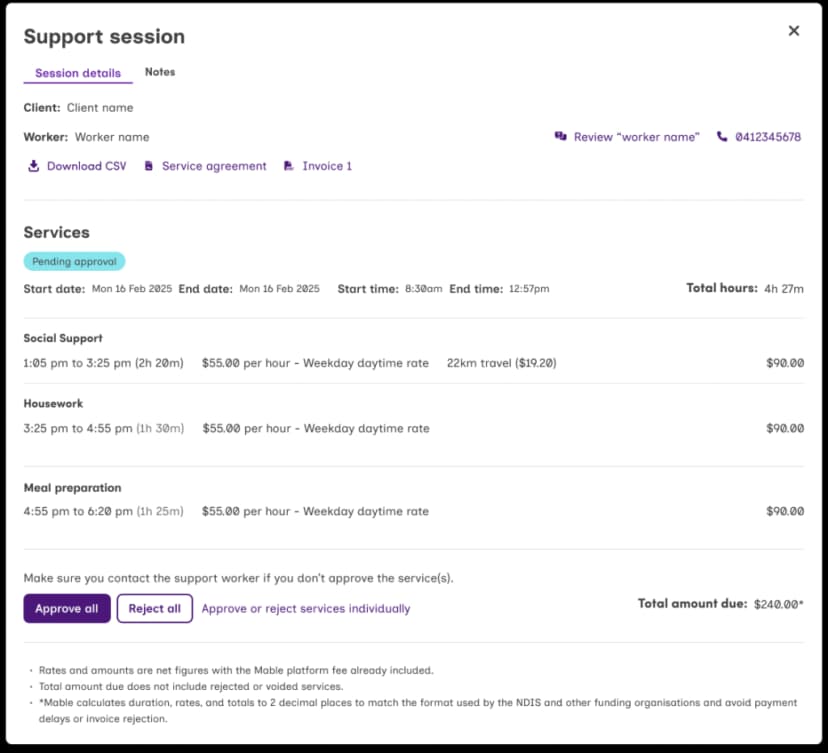
  1. If you want to approve the entire session, select Approve all.
  2. If you want to reject the entire session, select Reject all.
  3. If some of the services are correct but one or more need to be rejected, select Approve or reject services individually.
  4. To approve individual services, select Approve next to the service.
  5. To reject individual services, select Reject next to the service.
  6. Select Submit selection to submit your approved and rejected services.

Important note: If you reject all or some of the services in a session, the support worker will need to resubmit those services. We recommend that you contact them to let them know why you are rejecting the service.

Once the support worker has resubmitted, the support hours will appear in the compliance tab for you to review.


You might be interested in

Colleagues walking through an office having a discussion
Navigating NDIS Mandatory Registration Together with our Business Partners
What's Next for the NDIS Mandatory Registration reforms? The NDIS Commission has now made it possible for Mable to register specifically under the new class 0137 - NDIS digital platforms. NDIS digital platforms must comply with any new conditions of their registration by 1 January 2027. This change is part of broader reforms to strengthen quality, safety and oversight across the disability sector. These changes give our business partners confidence. Confidence that you can be sure Business Solutions by Mable is a critical part of a sustainable NDIS. We welcome these reforms because they recognise our high-quality and safeguarding standards. We have always prioritised these areas. That being said, we are actively adapting our systems to the proposed new requirements to ensure that Mable remains a useful tool to support your business needs, during and after regulatory changes. How are we managing the registration process? Mable plans to apply for registration as an NDIS digital platfor
Support worker dries dishes while talking to a client in a wheelchair.
Preventing everyday harm in support work
As a support worker, you want your clients to feel safe, respected and supported. You may already think carefully about how to provide safe support and prevent serious incidents. But harm is not always obvious. Sometimes, small everyday actions, words or assumptions can affect a client in ways you may not have intended or noticed at the time. This is sometimes referred to as everyday harm. Over time, these small moments can build up and may affect how respected, heard, in control or safe your client feels. The newly launched Everyday Harm website brings together practical resources to help support workers and organisations build safer, more respectful support relationships. These resources were developed through Australian Research Council studies, including interviews with people with disability about their experiences. Mable was proud to be involved in this project as an Industry and Community Partner organisation. We hope these resources help you better understand everyday harm
jenny-conor-device-600x450px_xa0fvc
Manage your care with the new Mable app for clients
The Mable: Find Support app is new and designed to make managing your support easier. It has a simplified design so everything you need is one place. In this article, we share what’s new in the app and how these updates can help you organise your support more easily. What’s new in the Mable: Find Support app? The new app features a new navigation menu that groups key features together, making it easier to find what you need. You can easily move between the four main areas: Home : View upcoming support sessions, updates, and quickly manage changes. My Support: Find everything related to your ongoing support here, including your current support workers, support hours and more. Find Support: An easier way to quickly post a job, search for support workers and more. Messages: Chat, video call or voice call with support workers. A simpler way to stay on top of your support Our new app gives you a more streamlined support experience, so you can spend less time looking for what you need